Skip to product information
1 of 7

SKU:LS32FM801UAXXA

Samsung 32" Smart Monitor M8 M80F 4K Samsung Vision AI

Samsung 32" Smart Monitor M8 M80F 4K Samsung Vision AI

Regular price R 15,499.00 ZAR
Regular price Sale price R 15,499.00 ZAR
Sale Sold out
Taxes included. Shipping calculated at checkout.
Quantity

Samsung 32" Smart Monitor M8 M80F 4K Samsung Vision AI

Experience next-level productivity with Samsung's 32" M8 Smart Monitor. This 4K display combines stunning visual clarity with Vision AI technology, delivering intelligent features that adapt to your workflow. The expansive screen real estate reduces eye strain during extended work sessions, while built-in smart capabilities eliminate the need for additional devices. Perfect for professionals, content creators, and multitaskers seeking a versatile, all-in-one display solution that enhances both performance and workspace efficiency.

  • Screen Size (Class) 32"
  • Flat / Curved Flat
  • Aspect Ratio 16:9
  • Contrast Ratio Static 3,000:1 (Static)

New AI Smart Monitor

Watch, Play, Work in Style with Samsung Vision AI. A front and back panel of Samsung Smart Monitor M8 with cursor, Wi-Fi, music, play button, and cloud icons popping out. Screen shows various apps, content, and preview of "Your Name in My Memory."

Key features at a glance

Smart TV experience with AI. Enjoy content directly and explore more with Click To Search. Main screen shows Smart TV apps page with various content and apps lined up. 4K AI Upscaling. Enhanced resolution with NQM AI Processor. A clear shot of a woman. AI Picture Optimizer. Optimal picture tailored for your intended use. When AI Picture Optimizer is ON, the screen is bright, but when it is OFF, the screen is dimmed. Knox Security. Multi-layered security for your sensitive data. SmartThings links to the monitor. Monitor shows a secure login screen. Secured by Knox logo.

Watch Together with your AI Companion

Watch Together with your AI Companion

Instant access to your favorite streaming content

Smart TV Apps

Stream content directly from your monitor, or tune into Samsung TV Plus to get live TV channels and on-demand content.

Monitor on desk displays Smart TV Apps page with various content and apps lined up. Samsung TV Plus logo.

* Features, services and app availability may vary by country and region. ** Samsung TV Plus and Universal Guide may not be available in some regions. *** Some features may require separate subscriptions. **** The user interface is subject to change without notice. ***** This Smart Monitor does not include a TV tuner, which is not necessary for streaming apps. ****** Internet connection is required. ******* Remote control specifications vary by country and region. ******** Keyboard and mouse control compatibility varies by app. ********* Access to the full range of smart features, such as network-based services, applications (including games and streaming services), and smart home functionality, requires a Samsung Account. Without logging in, functionality is limited to external devices, e.g. via HDMI. You can sign up for a free Samsung Account at https://account.samsung.com. Terms and conditions apply.

Discover what’s on your screen

Click to Search

Enrich your viewing experience with Click to Search. With just a click, you'll instantly get content recommendations and details on what you're watching — including actors' biographies, filmographies and more.

Monitor displays a scene of two characters riding a horse and Click to Search page on the right. Watch Next tab shows Imperial Blade preview image under Recommended Contents. Relevant details of content are shown.

* Feature available in certain regions and models only. ** Feature will be available on cable, and Samsung TV Plus. *** Actor details are provided based on the metadata associated with the content you’re watching. This information may not always be complete or correct, so please double-check the actor details.

Enjoy 7 years of Monitor upgrades for free

One UI Tizen

One UI Tizen is your personalized and enhanced screen experience, powered by Samsung Tizen OS. With One UI Tizen, you can take advantage of the latest and innovative Samsung features. One UI Tizen will also support Tizen OS upgrades for up to the next seven years.

* Content and services may vary by region and are subject to change without notice.
** Agreement to Smart Hub Terms and Conditions and Privacy Policy is required before use.
*** Some content and services require registration and subscription.
**** Requires Samsung account.
***** Tizen OS upgrades will be supported for up to 7 years starting from 2025, for products released in the year 2025.
****** Please note that the upgrade does not cover hardware-related performance, features or durability.

A metallic badge displaying ‘7 Years OS Upgrade for Free’. One UI Tizen.

AI-Powered Picture and Sound

AI-Powered Picture and Sound

Upscale your streaming content with AI

4K AI Upscaling

Unlock the full potential of a 4K screen when streaming content directly on your monitor. Powered by the NQM AI Processor, AI upscaling turns lower resolution content up to nearly 4K, transforming entertainment with new levels of definition.

* Viewing experience may vary according to types of content and format. ** Upscaling may not apply to PC connection and Game Mode. *** Screen images simulated for illustrative purposes.

Optimally tailored visuals with AI

AI Picture Optimizer

Experience optimal picture quality adjusted to your needs. AI Picture Optimizer adapts the visuals to help you work on documents with comfort, get fully immersed in games with deep, rich blacks and watch videos in vibrant colors.

AI Picture Optimizer ON shows clearer game, document, and video than AI Picture Optimizer OFF.

* Only available when using a PC connection. ** The supported image quality may differ based on the type of content detected by the function.

Hear every word clearly with AI

Active Voice Amplifier Pro

Enjoy an unparalleled audio experience with AI technology. Active Voice Amplifier Pro uses advanced audio processing to analyze voices and background sounds in your content and ambient noises around the monitor — delivering every word with crystal clarity.

* Screen images simulated for illustrative purposes.
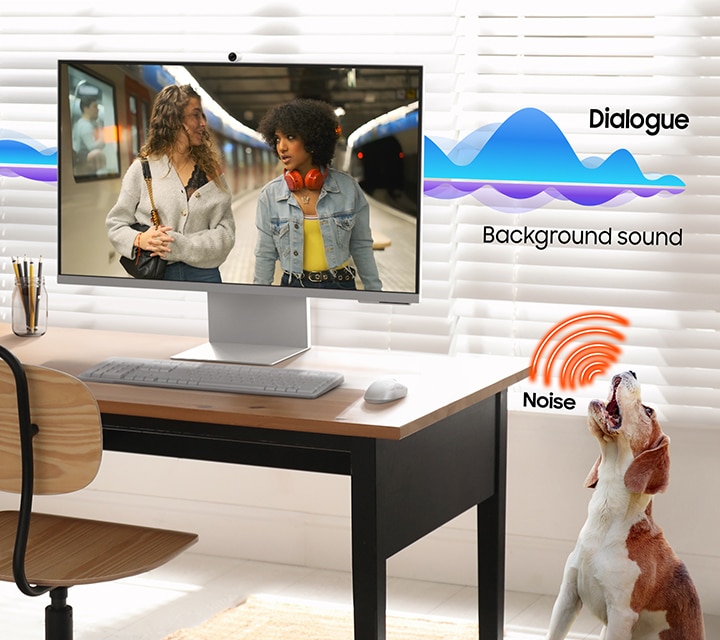
A modern monitor setup and a dog barking. Active Voice Amplifier Pro enhances Dialogue sound and Background sound becomes quieter.

Safe and Easy Connections

Safe and Easy Connections

Simple control for your smart home

SmartThings

See your smart home devices in a 3D Map View and manage them with ease. You can also check the energy usage and cost by device, and save money by putting them in energy-saving modes. Simply tap into the all-in-one IoT hub using your mobile phone or voice command — without pausing shows.

A monitor shows 3D Map View of home devices. Microwave, refrigerator and vacuum cleaner connected to SmartThings icon. Microphone icon with dialogue bubble reading "turn on the vacuum cleaner." Vacuum cleaner turned on.

* Technology, functions and features may vary by country, service provider, network environment or product, and are subject to change without notice. ** Requires Wi-Fi, Bluetooth or other wireless network connection, and devices registered to the SmartThings app. *** Connected devices are sold separately. For a full compatible device list, please check https://www.smartthings.com/products.

Your privacy. Secured on Samsung monitors.

Knox Security

Keep your monitor data safe and confidential with Samsung Knox. Its robust, multi-layered security and tightly controlled access also enhance the security of your IoT connections made through your Smart Monitor. Plus, your Smart Monitor comes with Knox Vault — a built-in hardware chip designed to safeguard sensitive information from physical attacks — adding an extra layer of protection for peace of mind.

SmartThings links to the monitor. Monitor shows a secure login screen. Secured by Knox logo.

* Samsung Knox safeguards the Smart Monitor and its IoT connections via the SmartThings app. It does not provide direct protection against hacking or physical attacks on IoT devices. ** Security software updates are guaranteed for at least five years from product launch. Latest software update is required.

Faster, easier access to your work tools

Workspace

Access and control your PC remotely, or work directly on the monitor. Built-in apps like Microsoft 365 let you bypass the PC for a simpler, more streamlined work experience. Plus, with Multi View you can see apps side-by-side and take your productivity to new levels.

* On-screen content simulated for illustrative purposes.
** Microsoft 365 requires Microsoft account. Some features of Microsoft 365 require subscription.
*** Windows 10 Pro, Mac OS 10.5 or higher, and compatible network settings are required for this feature.

Style and Convenience

Style and ConvenienceThere is a conference call on a monitor. And on the monitor, there is a camera attached. A close-up of the camera is shown.

Video calls without hassle

SlimFit Camera

Seamlessly stay connected with your friends, family and coworkers. SlimFit Camera attaches to your monitor and provides clear picture quality — allowing you to have video calls with ease.


View full details